Drop a bomb beside a crate, turn a corner and collect what survives. The last Detonaut standing earns a star. First to three stars wins the match.
Start a match
Choose Play on the title screen. Setup lets you pick the arena, 2 to 8 seats, keyboard, touch or gamepads, the bot level and the pickups. Bots fill every seat without a player. Seats are named by number, so seat 4 is always Bot 4 or Player 4.
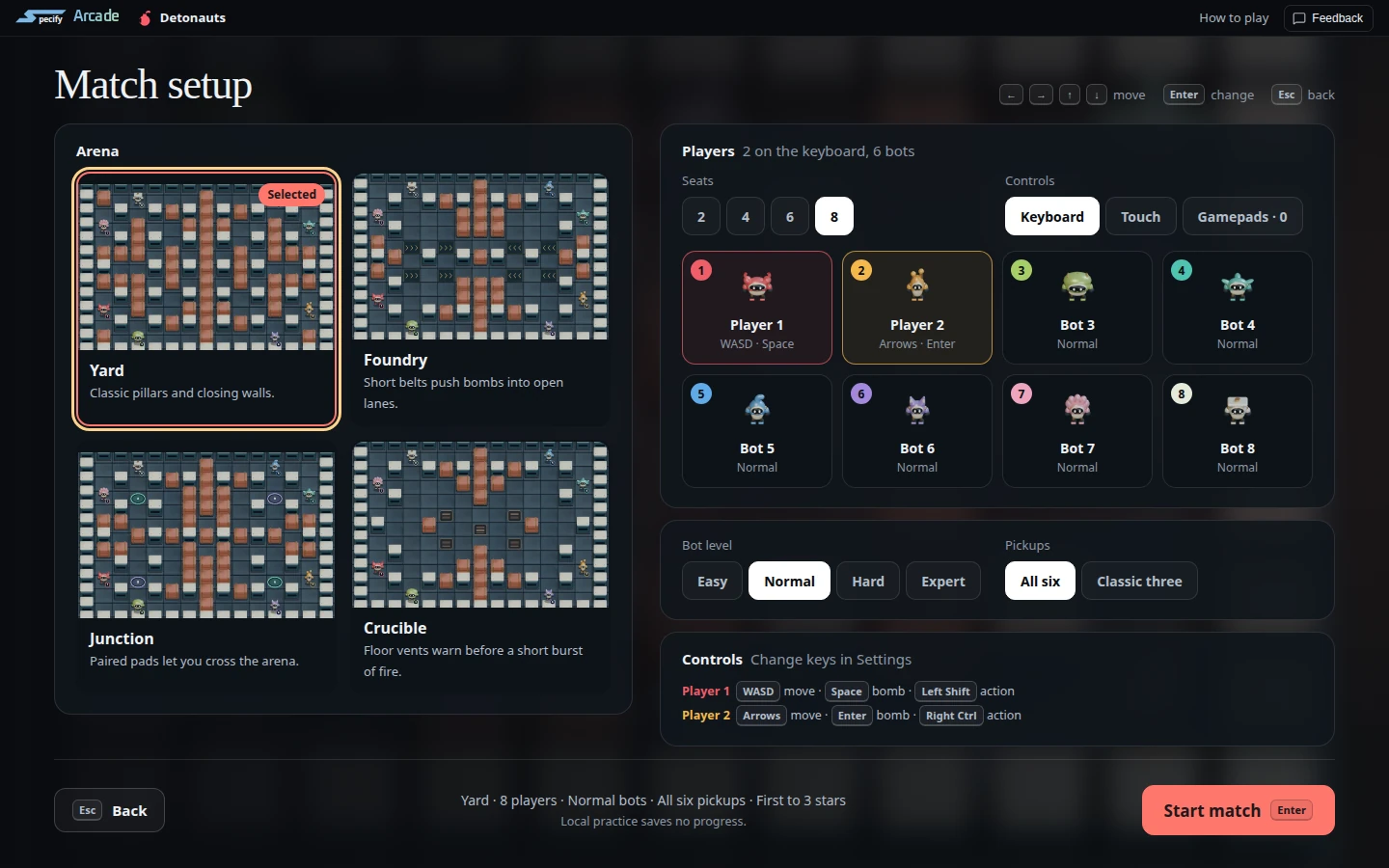 Setup: arena, seats, controls, bot level and pickups on one screen.
Read the player cards
Each seat has a card beside the arena. The three big numbers are what that player has now: bombs at once, blast range in tiles and speed steps. Grey numbers are the starting amount. When a player collects a pickup, that number glows in their color and a label such as +1 Longburn, Range 3 appears over them for about a second. Kick, Remote and Pierce each have their own slot, which lights up once collected and shows the level, up to 2. A number at its cap is marked max. A card turns grey when its player is out and says how.
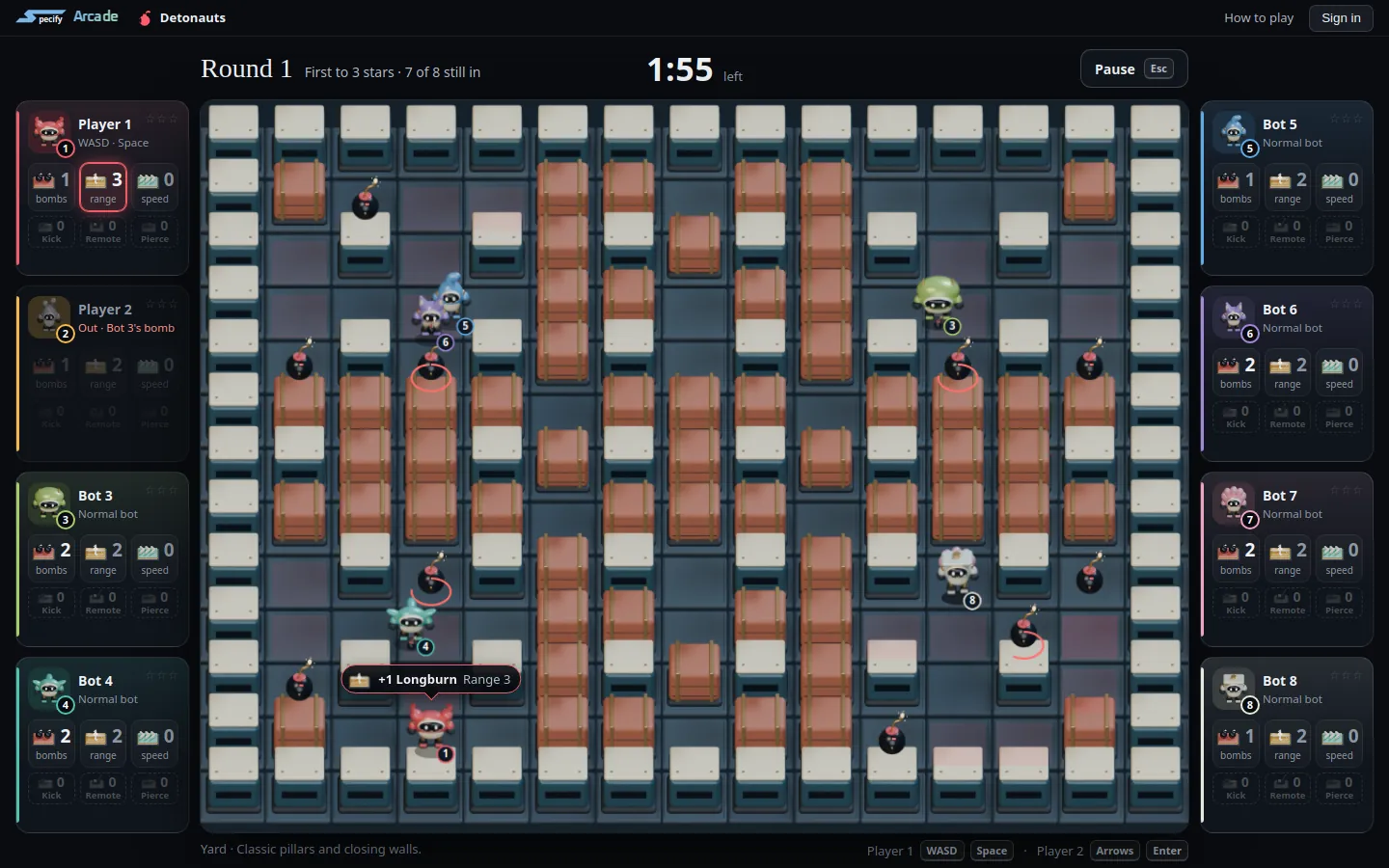 Player 1 just collected a Longburn. Their range chip glows and the label says Range 3.
Collect and survive
- Fuse Rack. Carry one more bomb per pickup, up to eight. 30% of random drops.
- Longburn. Each pickup extends every blast arm by one tile, up to ten. 28% of random drops.
- Quickstep. Each pickup adds speed, up to six steps (seven tiles per second). 16% of random drops.
- Shove Coil. Walk into a bomb to kick it. Action stops your last kick. A second coil makes kicks slide faster. 12% of random drops.
- Link Switch. Action triggers your oldest remote bomb. It expires after ten seconds. A second switch triggers all of them at once. 7% of random drops.
- Bore Charge. Each blast arm breaks up to two crates. A second charge breaks every crate in range. 7% of random drops.
Each crate has a 32% chance of a random item. Each quadrant also guarantees one Fuse Rack and one Longburn when it has enough crates, so these two appear more often. Classic pickups limit drops to bombs, range and speed, with two guaranteed bomb and range drops per quadrant. Pickups stack for the rest of the round, each copy adding one level up to its cap: eight bombs, range ten, six speed steps, and two each of Shove Coil, Link Switch and Bore Charge. A pickup collected at its cap is still used up. Link Switch and Bore Charge combine, so one bomb can be both remote and piercing. Bombs already placed keep whether they are remote and how far they pierce; Action follows your current Link Switch level. Everything resets when the next round starts.
Read the fuse
Bombs explode after 2.5 seconds. With a Link Switch they are remote bombs and last up to ten seconds, piercing or not. Their rings count down. Flames last half a second and travel in straight lines. Steel stops them and crates break. Another bomb starts a chain after two ticks. Your own bombs can knock you out.
Arenas
- Yard. Classic pillars and closing walls.
- Foundry. Short belts push bombs into open lanes.
- Junction. Paired pads let you cross the arena.
- Crucible. Floor vents warn before a short burst of fire.
Foundry belts push a bomb one tile after at most half a second. Junction pads marked A or B send you to the matching pad if it is clear. Crucible vents begin after 20 seconds, warn for 1.5 seconds and burn for half a second. With one minute left, walls start closing in from the edge and cover every feature. A tied final elimination is a draw.
Controls
Detonauts keyboard controls| Player 1 | WASD to move, Space to drop a bomb, Left Shift or J for Action, 1 to 4 for emotes. |
|---|
| Player 2 | Arrow keys to move, Enter or Right Shift to drop a bomb, Right Control or / for Action, 7 to 0 for emotes. |
|---|
| Escape | Pause and resume. The pause menu holds controls, settings, these rules, standings, restart and quit. |
|---|
| Menus | Arrow keys move, Enter selects, Escape goes back. |
|---|
Change any key in Pause or Settings, then Controls. Changes are saved on this device.
Controllers and phones
Connect standard gamepads and choose Gamepads in setup. Up to eight controllers get their own seats. Use the d-pad or left stick to move, A or Cross to bomb, B or Circle for Action, X and Y for emotes, and Start to pause. In menus the d-pad moves, A selects and B goes back. A disconnected controller pauses the game.
On a phone, the menus work upright. Turn the phone sideways to play: your card is at the top left, the clock and the other seats at the top right, the d-pad on the left and Bomb on the right. The face button opens four emotes. The Action button lights up while you hold Shove Coil, to stop a kicked bomb, or Link Switch, to set off your remote bombs early. Vibration follows your bomb drops and knockouts where supported, and can be turned off in Settings.
Online
Online guests can play without an account. Guest progress, rewards and perks are never stored. Online rooms are not open yet.